Joymore changelog
Documents View, Smarter Automations, and More.
Feature
Product Release
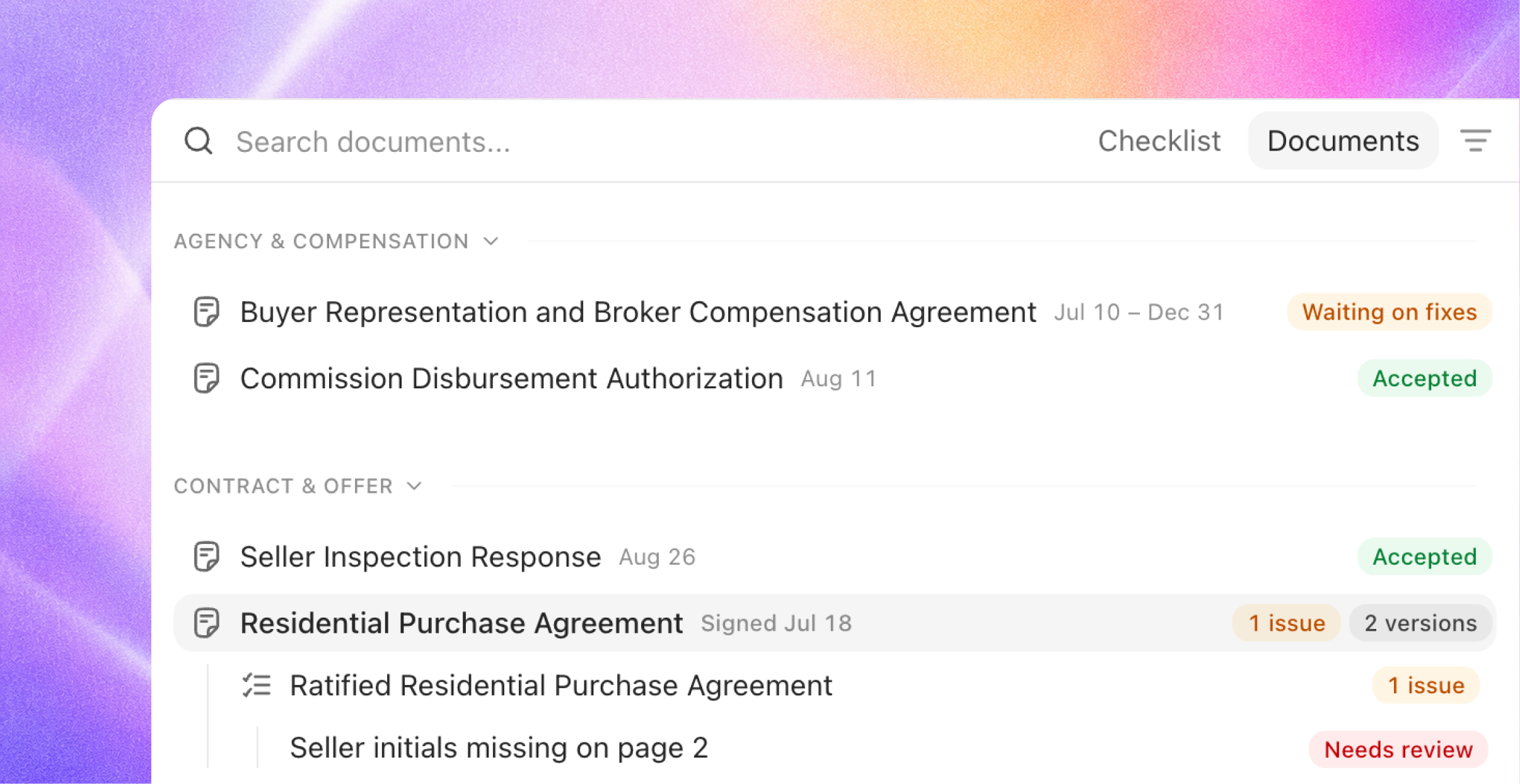
The Documents view
Compliance on a file now reads two ways. A new toggle in the compliance rail switches between Checklist and Documents: the same review, seen from either side.
Every document, exactly once. The Documents view lists each paper on the file a single time, grouped by category in the deal's arc: agency, contract, disclosures, inspections, financing, escrow and title, closing. The current version leads; prior versions sit one click away in each row's versions menu.
Requirements nest under the paper. Beneath each document sit the checklist requirements it answers, with the same status icons the checklist uses. The two views can never disagree; they are one dataset read from opposite ends.
Absence is visible, never noisy. Paper the file still owes appears under "Expected, not in file". Requirements that only apply in a later phase wait quietly as "Not expected until" that phase. Checks that aren't about any single instrument gather under "File-level checks".
Status at a glance. Each document wears one badge summarizing everything beneath it, worst state first: accepted, open issues with a count, waiting on fixes, failing, or not in file. Hover any badge and it explains itself.
Built for reading. Click a document and it opens alongside, with its issues nested beneath the row. No redirects, no surprises: the Documents view stages paper, and decisions still live where they always have.
Closing paperwork is now first-class along the way: closing disclosures, deeds, commission disbursements, and final walkthroughs are recognized as their own document types in a new Closing category.
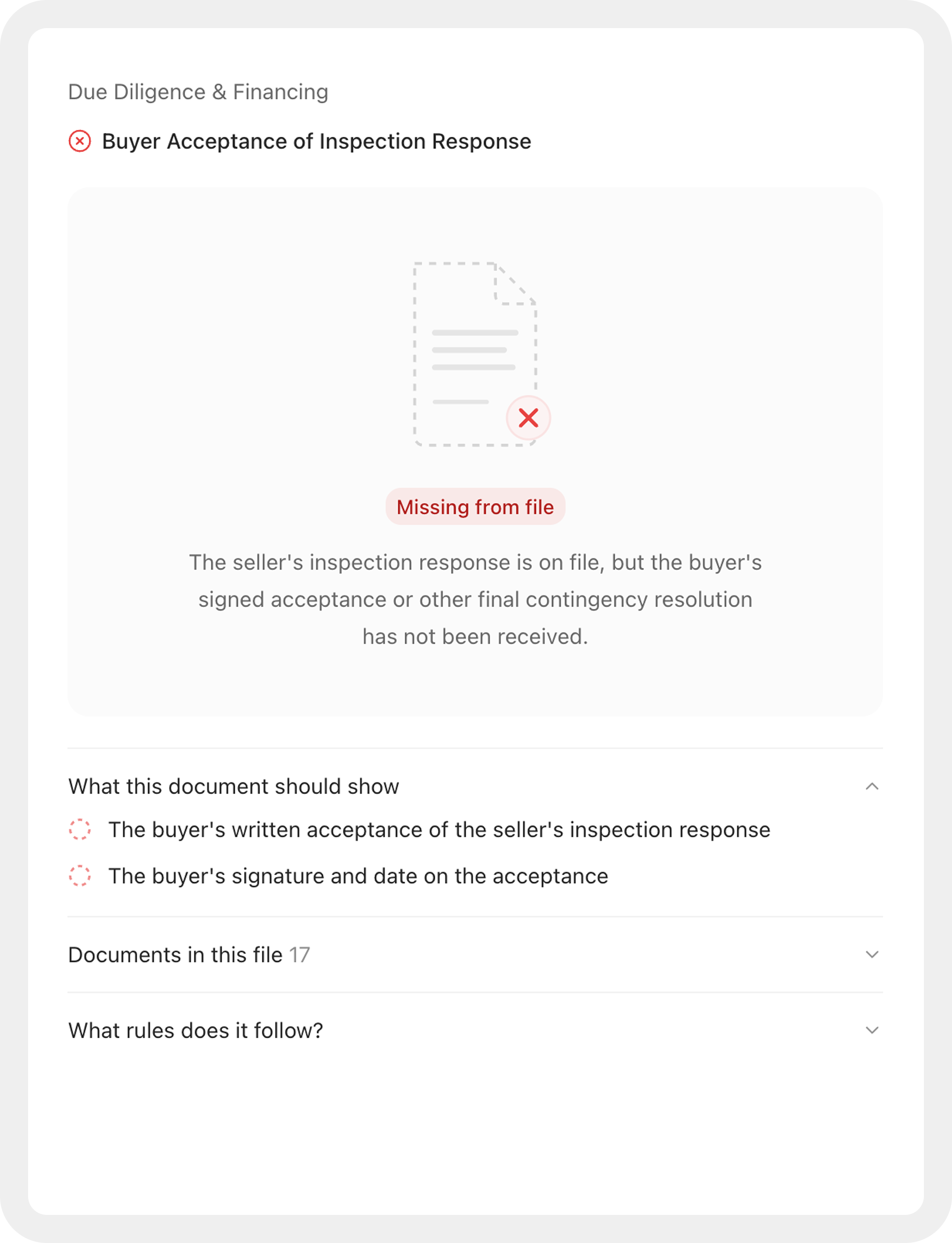
Verdicts that show their work
Every verdict names its paper. When Joymore marks a requirement satisfied or failing, it always cites the document that decides it and explains the call in plain language written for a broker, not a system log.
Satisfied items explain themselves. Hover a satisfied checklist item to see why it's satisfied: the reasoning, the deciding document, and if a person pinned the status, who and why.
Missing paper gets a real face. When a required document is absent, the file shows what's missing and what it would resolve, instead of an empty pane.
Progress you can trust. "Compliance in progress" now appears only while a review is actually running or new paper is about to be read. Files no longer sit in a permanent in-progress state after the work is done.
Automations, front and center
Automations moved out of Settings and into the main navigation, alongside Transactions and Communication. They earned the spot:
Run once. "Remind me tomorrow at 9" now runs exactly once, at that moment. One-time triggers are a first-class option in the schedule editor and in chat, so a reminder is never forced into a repeating schedule again.
The full lifecycle, from anywhere. Archive, unarchive, pause, and resume an automation in the app or by asking Joymore; the two can never disagree. Pausing no longer touches the trigger's configuration, and archiving stops connected-app listeners immediately.
Activation that finishes. An automation waiting on an app connection now turns on within minutes of the connection landing, and when something still blocks it, the blocker is visible instead of silent.
New means new. Asking for a new automation always creates one; an existing automation is only edited when you ask for that.
Triggers you can trust. The event picker offers only events that actually fire, and a connected-app automation starts listening the moment it activates.
Chat, quicker and steadier
Faster answers. Common questions, like where a file stands or what's happening across your book, are answered in one pass instead of a chain of lookups.
Uploads that hold up. Chat accepts files up to 100 MB, failed uploads say so instead of vanishing, a message never sends before its attachments are ready, and every attached file stays with the conversation, so a follow-up like "now run the review" sees all of them.
Stop means stop. Cancelling a response halts the work immediately, and approving or declining in the conversation resumes it right where it left off. Long-running jobs stay watchable live from start to finish.
Issues across the brokerage. Ask about open issues across every file, not just the one you have open.
Assign files in chat. Ask Joymore to assign a transaction to someone and it happens, even if they aren't on the team yet: Joymore adds the teammate and completes the assignment without leaving the thread.
A faster dashboard
The transactions list renders as soon as the first page arrives; the rest fills in behind.
The app boots with about a third of the JavaScript it used to ship, so first load is dramatically lighter.
Dark mode no longer flashes white on load.
Live updates arrive as per-row changes, so a busy brokerage's screen stays smooth.
One API for everything
The Joymore API now covers every entity in the platform: transactions, documents, checklists, issues, contacts, communication, automations, and the rest, roughly 95 operations projected from the same definitions the app itself runs on. The MCP server mirrors it one to one, so the AI tools your brokerage uses can work with Joymore through the same catalog. Organization API keys are scoped read-only; writes require member credentials.
Settings gained a Developer area to match: create and manage API keys, and follow quick-start guides for connecting Claude, Cursor, and other AI clients.
Fixes & improvements
One row per person on the Parties panel: a name written three ways no longer creates three participants, and spouses sharing an email are never merged into one contact.
A packet split into its individual documents no longer leaves the combined bundle in play on the file.
A blank signature line is never read as proof that a party hasn't signed, and signature checks got sharper across the review.
Facts and dates quoted from documents land more reliably, even when a value sits on a different page than expected or a scan breaks it across lines.
Assigning a file to a teammate no longer depends on whether their login is active.
Very large documents are handled as files in chat and no longer overwhelm a conversation.
An open email draft picks up Joymore's newer revision in place, and your own unsaved edits always win.
Files and reports delivered in chat now arrive after the explanation finishes, never mid-sentence.
Emails and texts Joymore drafts end cleanly after the content, with no sign-off naming the wrong person.
Team roster imports read large spreadsheets reliably, in every encoding Excel produces.
Interrupted background work recovers on its own within minutes instead of hours, and document intake never strands mid-read after a deploy.
Brief database hiccups retry silently instead of surfacing as errors.
Every toast notification can be dismissed by hand.
A completed review no longer leaves a stale "Not checked yet" on files that skip assessment.
"Back to app" always returns to a live page, never a dead link.
The document switcher is tighter and easier to scan.
Working with Joymore inside the document editor stays fast in long conversations.